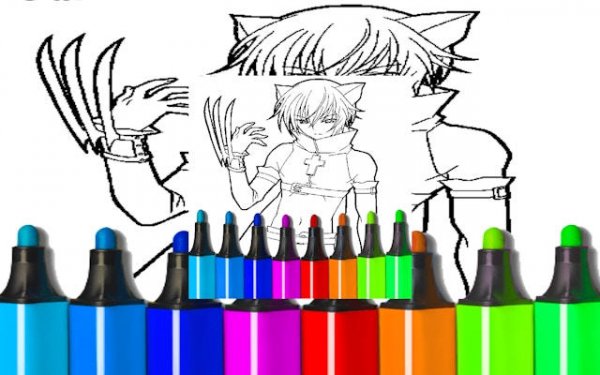
Manga Art Coloring Workshop - Ludoryx free online game

Manga Art Coloring Workshop

Children Japanese Animation Coloring Pages Creative Activity

Report an Issue

Let us know what's wrong with this game

Advertisement

Reviews

Manga Art Coloring Workshop succeeds by removing all pressure from the creative process. The collection of character illustrations provides enough variety to keep sessions fresh, while the intuitive controls let anyone jump in without a tutorial. The lack of timers or scores is a deliberate strength, making it ideal for relaxation. Saving completed pieces adds a sense of accomplishment, and the browser-based format means it is always ready when you are.

About this game

Artistic Freedom

Manga Art Coloring Workshop presents a gallery of black-and-white line illustrations featuring character designs commonly seen in Japanese animation. Each image is ready for personal interpretation through color. Players select a picture that appeals to them and use the available tools to fill in the outlined sections. The process is entirely self-directed, allowing for unique results every time. There are no predefined color schemes or required outcomes, which encourages experimentation and individual style.

Simple Controls

The interface is built for ease of use. A palette of colors is displayed on the screen, and players tap or click on the area they wish to color. Different brush sizes may be available to add detail or cover larger spaces. Switching between colors is straightforward, and any mistakes can be corrected without penalty. This design makes the activity accessible to young children and adults alike, without requiring any prior artistic skill.

No Pressure Environment

Unlike many digital games that rely on points, levels, or time limits, this experience is purely about the act of coloring. Players can work at their own pace, take breaks, or return to a piece later. The absence of external goals reduces stress and promotes a calm, focused state. This makes it suitable for unwinding after a busy day or for quiet playtime.

Built for Sharing

Once a piece is finished, the game typically allows players to save their work. Some versions may include an option to share the completed image with friends or family. This feature adds a social dimension without requiring direct interaction, making it a safe way for children to show their creations. The saved gallery also lets players look back at their progress over time.

Accessible Anywhere

Because Manga Art Coloring Workshop runs entirely in a web browser, there is no need to download software or create an account. It works on various devices, including tablets and computers, as long as an internet connection is available. This low barrier to entry means anyone can start coloring within seconds, making it a convenient option for quick creative breaks.
Compatibility

๐Ÿ’ป Desktop | ๐Ÿ“ฑ Mobile | ๐Ÿ“Ÿ Tablet
โ€“ All supported ยท Best with Chrome or Safari

Faq

Is Manga Art Coloring Workshop free to play?
Yes, the game is completely free to use. There are no hidden charges or subscription fees. All illustrations and coloring tools are accessible without payment, making it a cost-free creative outlet for anyone with a web browser.
Do I need to create an account to play?
No account or registration is required. You can start coloring immediately by visiting the website. This design prioritizes privacy and ease of access, especially for younger players who may not have email addresses.
Can I save my colored pictures?
Most versions of this type of game allow you to save your completed artwork to your device or to an in-game gallery. Saving lets you keep a record of your creations and share them with others if you choose.
What devices support this game?
The game works on any device with a modern web browser, including desktop computers, laptops, tablets, and smartphones. Touchscreens and mouse inputs are both supported, so you can play on almost any screen size.
Are there different difficulty levels?
The game does not use difficulty levels. Instead, it offers a range of illustrations with varying amounts of detail. Some pictures have large, simple areas to color, while others contain finer lines and smaller sections for more precise work.
Can I undo a color I applied?
Yes, the game typically includes an undo function that lets you reverse the last action. This feature helps you correct mistakes or try different color combinations without starting over from scratch.

Comments

0 comments
U
User
Share your review
Rating:
Loading comments...