Details

Cosmic Force Playground
Developer: Blood Studio
Updated: 2026-07-21
Creative Experimentation Physics Simulation Open-Ended Play

Cosmic Force Playground

Reviews

Cosmic Force Playground succeeds where many sandbox games fail: it makes physics feel accessible and fun. The tool variety is just right, offering enough options to keep experiments fresh without overwhelming new players. The custom world builder adds significant replay value, letting you design specific scenarios. Performance is smooth even with complex simulations, and the browser-based nature means zero setup. While it lacks a progression system or goals, that is precisely the point. This is a tool for exploration, not a guided experience. Recommended for anyone who enjoyed classic physics toys like The Powder Toy or Universe Sandbox.

About this game

Core Experimentation Loop

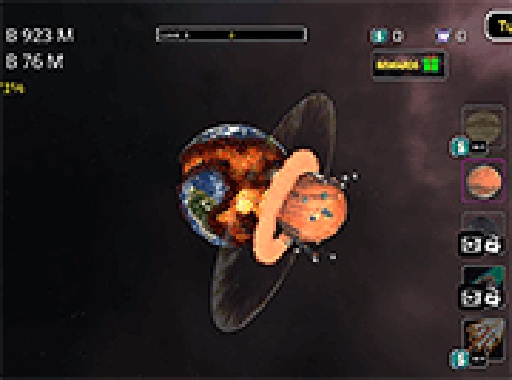
At the heart of this sandbox is a simple cycle: select a planet, choose a tool, and observe the outcome. Each planet has unique material properties that determine how it reacts to applied forces. Some crumble under pressure, others split into fragments, and a few may collapse inward. The simulation runs in real time, giving immediate visual feedback. This loop encourages repeated testing, letting you compare results across different planets and tool combinations.

Tool Selection and Behavior

The game provides a collection of futuristic devices, each designed to apply a specific type of force. Lasers deliver concentrated heat, projectiles transfer kinetic energy, and gravitational tools alter the local pull on the planet's surface. Each device has a distinct visual effect and interacts with the planet's material in a unique way. Trying the same tool on two different planets can produce completely different results, highlighting the importance of material composition in the physics engine.

Custom World Creation

Beyond the preset planets, you can build your own environments from scratch. This feature lets you define the size, shape, and material of your test subjects. Once your custom world is ready, you can apply any tool to see how it behaves. This flexibility turns the game into a personal laboratory, where you can set up specific scenarios to test hypotheses. It is particularly useful for understanding how multiple forces interact when applied in sequence.

Accessibility and Performance

The game runs entirely in a web browser, requiring no downloads or account creation. It is optimized for desktop computers, with mouse and keyboard controls providing precise aiming and activation. The physics calculations are handled efficiently, ensuring smooth performance even during complex simulations. This makes the game accessible to anyone with a modern browser and an internet connection, removing barriers to entry for curious learners of all ages.

Learning Through Play

Rather than following a scripted story, this sandbox emphasizes discovery. Each session becomes a mini science experiment, where you can ask questions like 'What happens if I apply heat to a gas giant?' or 'Can I create a stable ring of debris?' The game rewards curiosity and patience, as subtle differences in material reaction can reveal deeper principles of physics. It is designed for those who enjoy hands-on learning and want to see cause and effect in a safe, digital space.
Compatibility

Play on Any Device | Chrome / Safari / Edge Recommended
PLAY NOW

Faq

Do I need to create an account to save my custom worlds?
No account is required to play or build custom worlds. However, custom worlds are stored temporarily in your browser session and may be lost if you clear your cache or close the tab. For long-term preservation, consider taking screenshots or notes of your favorite setups.
Can I play Cosmic Force Playground on a tablet or smartphone?
The game is designed primarily for desktop browsers with mouse and keyboard input. While it may function on some tablets with touch screens, the precise aiming required for certain tools can be challenging. Performance on mobile devices may also vary due to limited processing power.
Are there any in-game purchases or advertisements?
The game is completely free to play with no in-game purchases, subscriptions, or advertisements. All tools and features are available from the start. This allows you to focus entirely on experimentation without any interruptions or paywalls.
How realistic is the physics simulation compared to real-world science?
The simulation uses simplified physics models that capture key behaviors like gravitational pull, material fracture, and thermal expansion. While it is not a substitute for professional simulation software, it provides an intuitive and visually engaging way to understand basic principles of force and matter.
Can I share my custom worlds or experiments with other players?
Currently, there is no built-in sharing feature for custom worlds or experiment results. However, you can capture screenshots or record your screen to share your findings on social media or with friends. The developers may consider adding sharing options in future updates.
Is there a tutorial or guide for new players?
The game does not include a formal tutorial, but the interface is straightforward. New players can start by selecting a planet and a tool to see immediate results. The custom world feature includes basic controls for adjusting planet properties, making it easy to learn through trial and error.

Comments

0 comments
U
User
Loading comments...

Similar Releases

Lunar Trajectory Puzzle Challenge
Physics Simulation Learning Puzzle Space Science

Lunar Trajectory Puzzle Challenge

Cosmic Force Playground
Creative Experimentation Physics Simulation Open-Ended Play

Cosmic Force Playground